
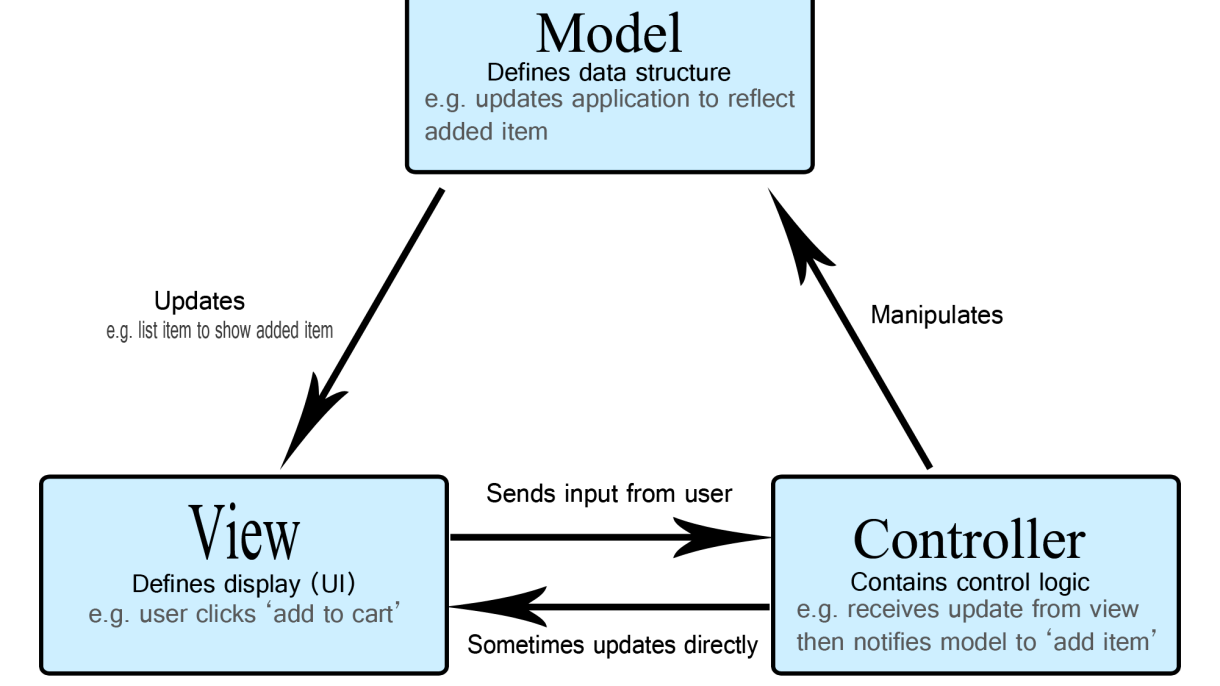

MVC (Model-View-Controller) is a widely-used software architectural pattern for developing user interfaces that divides an application into three interconnected components. This separation helps organize code, improve maintainability, and support scalable development.
What is MVC?
MVC stands for:
Model – Manages the data, logic, and rules of the application.
View – Represents the UI (User Interface). It displays data from the model to the user.
Controller – Handles user input, manipulates the model, and updates the view.
This design pattern was introduced by Trygve Reenskaug in the 1970s and has since become a standard in many modern web frameworks such as Laravel (PHP), Django (Python), ASP.NET (C#), Ruby on Rails (Ruby), and Spring (Java).
How MVC Works: A Simple Flow
User interacts with the View (e.g., clicks a button).
The Controller receives this input and processes it.
The Controller updates the Model (e.g., changes data).
The Model notifies the View of the updated data.
The View reflects these changes in the UI.
This separation of concerns makes the code more modular and easier to maintain.
Components Explained
1. Model
Central component of MVC.
Directly manages data, logic, and business rules.
Retrieves or saves data to a database.
Example: A
Usermodel that interacts with theuserstable in the database.
2. View
The visual representation of data.
Receives data from the model via the controller.
Should contain minimal logic (just enough for rendering).
Example: An HTML/CSS file showing a list of users.
3. Controller
Acts as the middleman between Model and View.
Handles requests and routes them appropriately.
Updates the model and chooses the correct view.
Example: A
UserControllerhandling the logic to show or edit user data.
Real-World Example: User Registration
User fills a registration form (View).
Controller receives the form data and validates it.
Model saves the data in the database.
Controller redirects to a welcome page (View) with the user’s data.
| Framework | Language | MVC Support |
|---|---|---|
| Laravel | PHP | Built-in MVC support |
| Django | Python | MTV (Model-Template-View) variant of MVC |
| Ruby on Rails | Ruby | Strict MVC architecture |
| ASP.NET Core | C# | Full MVC framework |
| Angular/React | JavaScript | Follow MVVM/MVC variants |
Benefits of Using MVC
Separation of concerns (each component has a clear role)
Easier testing and debugging
Parallel development (designers work on views, developers on controllers/models)
Reusability of code
Scalability for large projects
Drawbacks
Increased complexity for small projects
Steeper learning curve for beginners
More files and structure to manage
Best Practices When Using MVC
Keep models lean and focused on business logic.
Avoid putting logic in views.
Controllers should be thin and delegate responsibilities to services.
Use RESTful routing to keep things clean.
Maintain a consistent folder structure.
MVC vs Other Patterns
| Pattern | Description |
|---|---|
| MVVM (Model-View-ViewModel) | Used in Angular/WPF; includes a ViewModel that binds View and Model. |
| MVP (Model-View-Presenter) | Presenter handles logic and updates view. Common in desktop apps. |
| MVC | Ideal for most web applications with clean separation of concerns. |
Conclusion
The Model-View-Controller (MVC) pattern is a powerful and proven approach to building structured, maintainable, and scalable applications. By separating concerns into individual components, developers can work more efficiently and build applications that are easier to test, modify, and extend.
Whether you’re working on a simple blog or a complex enterprise platform, understanding and applying MVC principles can dramatically improve your software architecture.
